
Fake AI application detection
On macOS, the Endpoint Suite checks that the AI applications on a machine are actually from the vendors they claim to be.
How
Every macOS application is code-signed with a Team ID. Sentilai compares the Team ID of each installed AI application against the vendor's real, pinned identity — Anthropic, Cursor and Microsoft — and also checks it is installed where it should be.
An application called "Claude" that is signed by somebody else, or that lives somewhere unusual, is flagged.
Why it is worth having
The AI tool on a developer's machine holds a session that reaches your Gateway, and it sees every prompt. A convincing impostor is a very direct route into the middle of your AI traffic. Distributing a lookalike of a popular developer tool is neither novel nor difficult.
macOS only
This depends on the operating system's code-signing infrastructure. There is no equivalent check on Windows yet — which is one of several reasons the Windows track is still behind.
If something is flagged
Treat it as a real finding. Ask the developer where the application came from. The legitimate explanations — a beta from the vendor, a build installed by a package manager — are easy to confirm, and the illegitimate one is worth catching.
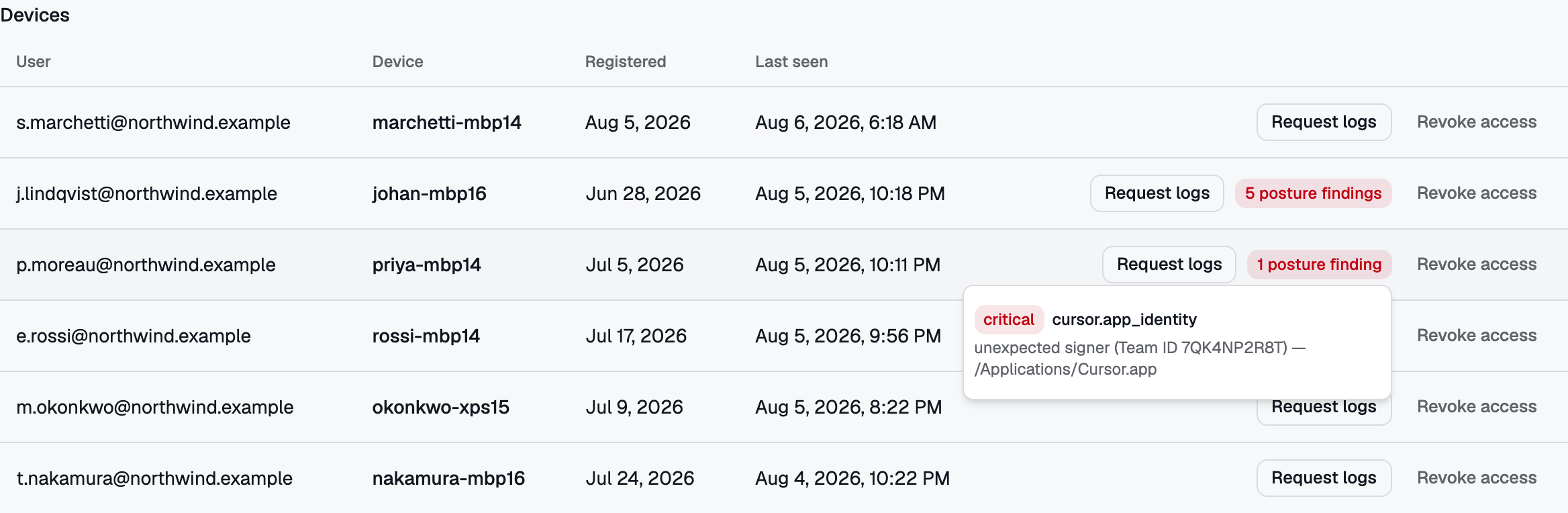 The same badge carrying a very different finding: an application installed as Cursor, signed by a Team ID that is not Cursor’s. macOS only — it relies on the operating system’s code-signing infrastructure.
No comments to display
No comments to display