
Posture findings
The Diagnostics screen can show a posture findings badge on a device, coloured by the worst severity found. These are not about Sentilai's configuration — they are about how much autonomy the AI tools on that machine have been given.
Why this exists
An AI coding assistant's own settings decide whether it asks before running a command, whether it can write files freely, and whether it can reach the network from inside its sandbox. A developer who turned all the guard rails off has changed their risk profile far more than any policy you set in Sentilai.
You cannot govern what you cannot see, so the Endpoint Suite reads those settings and reports them.
What is checked
Claude Code
permissions.defaultModeset tobypassPermissions— critical. The assistant acts without asking, ever.- The same setting on
auto,dontAskoracceptEdits— warning. - A bare
BashorBash(*)allow rule — critical. Unrestricted shell. - Broad
Write,EditorWebFetchgrants — worth knowing about. - Presence of
hooks.PreToolUse— code that runs before every tool call, which is powerful and worth being aware of.
Codex CLI
approval_policyset toneveroron-failure.sandbox_mode: danger-full-access.sandbox_workspace_write.network_access: true.
Per-profile variants of these are checked too.
Report-only
Nothing here is blocked or changed. Clicking the badge lists each finding with its check id, severity, the observed value, and which configuration file it came from — enough to have a specific conversation rather than a vague one.
What is read
Configuration files only. Never prompts, never source code.
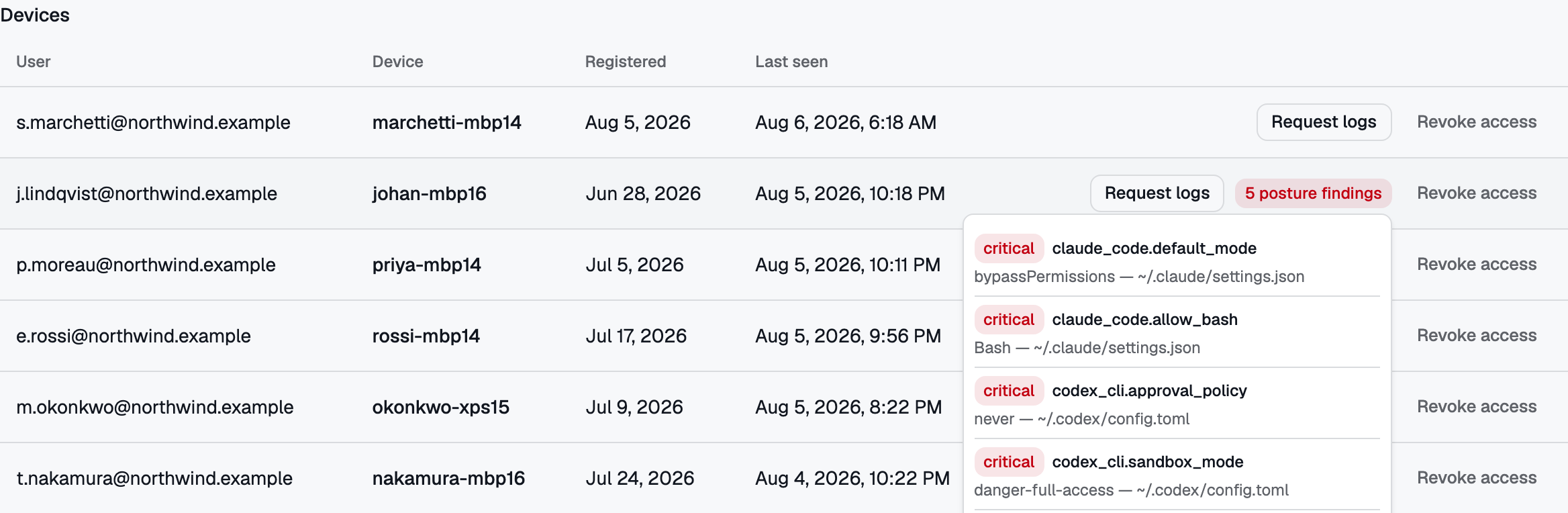 A posture badge opens into the findings behind it: Claude Code running with permissions bypassed and a bare Bash grant, Codex CLI approving nothing and sandboxed with full access. Report-only — nothing here is blocked.
No comments to display
No comments to display