
Ungoverned-agent policy
On Policy → Ungoverned AI agents you choose what happens when an autonomous AI agent Sentilai does not govern is found on one of your devices. Read Ungoverned AI agents under Devices and logs first — this page is only about the consequence.
This is the one setting in Sentilai that can take a developer's AI tools away without an admin doing anything at the time. It is worth ten minutes before you change it.
Three positions
Report it only — the default. The agent appears on the Overview tile and in Diagnostics. The device stays compliant and keeps working. Nothing else happens.
Mark the device non-compliant — the device additionally shows Non-compliant in the console. Still nothing is denied. Use this when you want the fact visible in your own reporting without changing anyone's day.
Block the device's access — the Gateway refuses that device's token. Its governed AI tools stop working.
There is deliberately no "off". Detection is not something a tenant switches off; the feature exists so that an admin cannot be unaware. If you do not care, leave it on Report.
The default is Report, and that is not an accident
Nobody is blocked by a Sentilai deployment or upgrade. Blocking is a decision you make on purpose, with a warning on screen telling you what it will do.
What blocking actually does — and does not
Blocking is coercive, not preventive.
OpenClaw talks to its provider directly. We are not in that path and cannot stop it. What blocking does is take away the developer's governed tools — the traffic that was flowing through us, audited and policy-checked — while the ungoverned agent carries on untouched.
The lever is "you get your AI assistant back when you remove the agent", and it works because developers want their assistant. It is not a technical control over the agent, and we will not describe it as one.
If you need to actually stop the agent's own traffic, that is a network-level or MDM control, not this setting.
The grace period
Default 24 hours. The block applies only once the window has elapsed, measured from the later of:
- when the agent was first detected on that device, and
- when you changed the setting.
Both terms matter. Measuring from detection alone would cut off every developer who already had an agent installed the instant you flipped the switch — no warning, nothing they did that day. Measuring from activation alone would give a fresh install after that point no window at all.
Taking the later of the two gives every affected developer the full window from the moment the rule first applies to them.
A grace period of 0 is allowed. An admin who wants an immediate block can have one, and the screen says "immediately" when you choose it.
What the developer sees
Not "your credential has been revoked" — that would be false, and would send them looking for an admin who revoked nothing. Their tool reports:
access blocked: an ungoverned AI agent (OpenClaw) was detected on this device — remove it to restore access
It names the agent and the one action that fixes it.
Recovery is automatic
Uninstall the agent → the device's next poll finds nothing → the episode closes → access returns within about half a minute. No ticket, no admin action, no manual unblock.
The converse is deliberate: a device that stops polling keeps its open episode and stays blocked. The last thing we actually observed was an agent present, and absence of evidence is not evidence of removal. Since the Endpoint Suite polls on launch, a laptop that comes back from a week off clears itself in seconds.
Timing
Blocks and unblocks propagate on the Gateway's refresh cycle — about 30 seconds, the same as manual device revocation and device-session timeouts.
An explicit revocation still wins
If an admin has separately revoked a device, removing the agent does not restore it. The stronger, admin-initiated fact takes precedence, so removing an agent can never appear to restore access that a real revocation still denies.
Not available yet
Worth knowing before you plan around them:
- Per-agent or per-severity policy — "block on the lethal trifecta, tolerate a sandboxed install". One knob today.
- Per-developer or per-team exemptions.
- An alert when a device gets blocked. It appears in Diagnostics and in your SIEM stream, but it does not fire a real-time alert channel.
Recommended path
- Leave it on Report and look at what Diagnostics actually shows for a week.
- If anything appears, talk to those developers before changing the setting.
- Move to Block with the default 24-hour window, not zero.
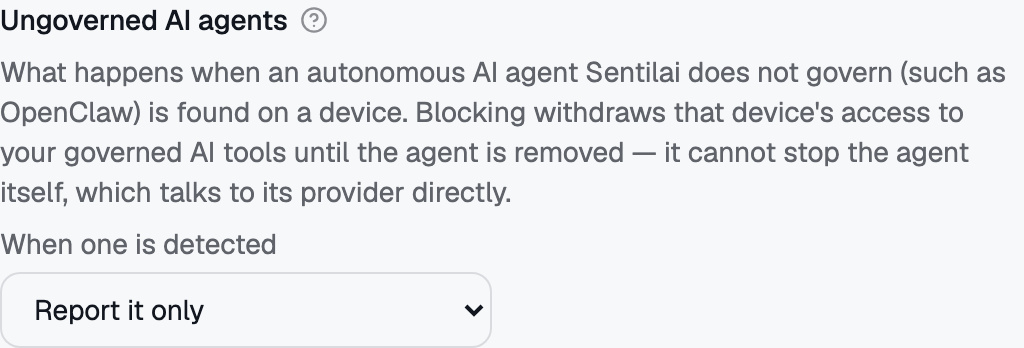 The ungoverned-agent control: three positions, no "off", and a grace window that only applies to Block.